Welcome to our blog Fabulessly Frugal! You too can be FABULOUSLY FRUGAL with out breaking the bank!

WE'VE MOVED! Come on over to FABULESSLYFRUGAL.COM and see our "NEW LOOK! and resubscribe to our new feed!

Newbie? Check out our couponing basics. Come back often to see the latest printable coupons, freebies, coupon tips and frugal living tips! Got something to say? Leave us a comment! Lastly, subscribe via RSS or Email to get the latest updates! We are located in Boise, Idaho, and blog about stores found in the Northwest and Nationally!

Showing posts with label Blog. Show all posts

Wednesday, November 18, 2009

Guest Posting Today at "How Does She"


Go check out the FABULOUS new site
How Does She...
TODAY!

We were honored that they invited us to do a guest post,
so of course we had to write about one of our favorite past times...
COUPONING!


Go check it out, leave a comment, and let the lovely ladies know we sent you over!!

While you're there - snoop around
(and try not to drool at the gorgeous photography!)
.

You'll find amazing topics such as:


30 Days of Neighbor Gift Ideas
{including one fab idea that
will help you use up all the
boxes of ice cream in your freezer!}

Things you can do to
keep the spice in your marriage.
{try this - this one is fun!!}


{what every woman MUST know!}


{cutest decor ideas ever!}


These ladies are so clever.
They show you how to make a
Shutter Message Board.
{so stinkin cute!}


I could go on for quite awhile. But I'll let you go discover How Does She... for yourself. I know you're gonna love it!

ps - Thank you for the invite lovely ladies!

Bookmark and Share


Saturday, October 10, 2009

Announcing Our New Site

Warning... Locals Only!


We wanted a place for the locals to come where they could share their deals and inside tips. A place to go to and only see info that applies to you!

Announcing...


If you are local to Boise you will want to get in on this!

We have invited our previous class attendees and a few other special friends we have met through blogging. They are already actively posting!

If you have something to share or just want to be part of the club, send us and email fabulesslyfrugal at gmail dot com and we will send you and invite to contribute to the blog.


Bookmark and Share

Monday, September 28, 2009

CHECK IT OUT! Mediocre Moms Guide to Greatness

I am so excited to share this new blog with you! In her quest to become a "great" mom, reader Becky (and my fabulous cousin) from Utah has started a blog titled THE MEDIOCRE MOM'S GUIDE TO GREATNESS.


What is this blog all about??


Each day, she will post an idea for a (cheap, free, easy) activity for you to do with you child(ren). Not something fancy or out of this world. Just something. Because SOMETHING is better than NOTHING!


She is "officially" launching her site on October 1st. But she is currently running a pre-launch giveaway. Go check it out and subscribe to her feed. If you have kids, this is something that will benefit you for sure!!


Bookmark and Share

Thursday, September 17, 2009

How to Leave a Comment


Tonight I met our reader Caitlin who had a great tip, but didn't have a "google account" to leave a comment, and she wasn't sure how to set one up so she COULD leave a comment!

I've heard this from class attendees as well (and just got an email from another reader with the same comment!), so I thought today was a fabulous day to teach some of you HOW to do this!


And guess what??? You DO NOT have to make a new google email address (although, gmail is so stinkin cool, you really should consider it!) in order to set up a google account!


SO - Let's say you read a post and have your own fabulous tip to add to it. First thing you're going to do is look at the bottom of the post for this:


If you just click on those words (sometimes it says 1 Comment, 7 comments...) a new box will pop up that will look like this:
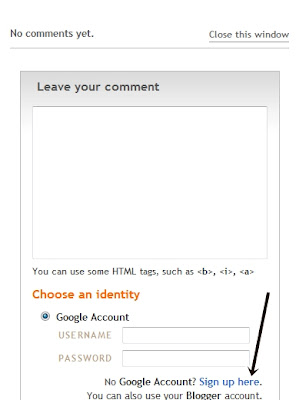

Now here it is telling me to enter my username and password for a Google Account. In my prebogging days, that is where I stopped. I didn't want to open some new account!

But it's easy peasy! I'm going to show you what to do.

  1. Click on "Sign Up Here" as shown in the window above.

  2. First thing you'll do is input your existing email address (msn, yahoo, hotmail, all of those will work for this!) - they'll have you enter it twice.

  3. Then create a password. This is for your "google account". It is linked to the email you enter. You are NOT making a new email account.

  4. Pick a "display name". This is what people will see next to your comment... some people do something fun (aka: Hiccups) or just their first name. I don't recommend using your full name for this though.

  5. Click (or unclick) the "email notifications" box.

  6. Then you'll have to do the whole word verification thing. These are annoying I know. And a lot of times I can't even tell what the letters are! If you get it wrong, they'll just put a new set of letters up, so don't worry about it. Eventually you'll get one that you can actually read!

  7. Click on the box to accept the terms of service and then click on "continue".

  8. The next thing that will happen, it will take you to the comment form! And there you can tell us all what you want to say, and you'll see your nice little display name!

  9. Also, you can click on the option to have follow-up comments emailed to you, which is sometimes a nice little feature!

  10. Then just click "Publish Your Comment" and there you go!

At this point, you'll see your comment with your name right above it. If you click on your name, you'll see your own profile. Since you are still logged in, you can click on the box "edit profile" and from here you have a lot of things you can do if you wish. For example, you can upload a picture, change your user name, or make your profile private if you wish.

So there you have it! Now you can share your ideas, tips, and great finds super duper easily!

If this still doesn't make sense to you, leave a comment... oh wait, ha ha (just kidding), just email us at fabulesslyfrugal {at} gmail {dot} com and we'll do our best to help you out!

If this DID make sense to you and you are all set up, then....


LEAVE A COMMENT! :)


ps - The tip was that at Albertsons on Orchard and Overland they have the Hannah Montana toothpaste clearanced at $.99. Double the $.50/1 toothpaste coupon (I'm not sure which brand, can you help me Caitlin?) and you'd get it free!

Bookmark and Share

Monday, February 23, 2009

Button Button Who's Got the Button?

Did you ever play that game with your family? We did!! Many Monday night memories of that one! (Feel free to ignore the ramblings of a 34 year old woman...)

We've done a little revamping on the blog and just wanted to make sure you grab our new button! Thank you loyal readers and fans!!

Here's a big ol {{hug}} for ya!


Sunday, February 1, 2009

Lemonade Award!


I've been so busy, I haven't had time to recognize the award we received not only from Michelle over at Saving Some Green, but also from Marne from Making Life Sweet... One Deal at a Time. Thanks Ladies! What an honor! We sure are having fun with this blog!

So who do I pass it on to? Of course, I'll send it on over to those Krazy Coupon Ladies - another local bunch who is helping us all save some cash! They've got a bunch of women posting - so there is always some action going on over there!

I also must send one over to Laura at Real Mom Kitchen, she has THE BEST recipes!! Although she isn't a "coupon/frugal" blog, she definitely has helped me save money as she has inspired me to cook and try new recipes, when I would have grabbed a burger instead. Thanks Laura!

And lastly, to the crafty creative Marie at Makes and Takes - she has given me so many great ideas for my preschool... these ideas are most often things you can make with everyday items in your home.

Thank you ladies, for your very "unsour" attitudes - I'd say you're as sweet as can be and you inspire me!

Wednesday, January 28, 2009

My Google Reader Shared Items

If you are looking for more deals and freebies be sure to check out My Google Reader Shared Items. I put the latest hot posts in there so you to get more great deals. Check it out in the side column. Did anyone set up a google reader?

Sunday, January 25, 2009

Google Reader


Google Reader is my best resource for reading and staying up to date on my coupon blogs.

-It reads like email so I don't have to go from site to site checking for updates.
-I can store all of my favorite sites in one place.
-I can use the search feature to search a particular blog or all of the sites in my reader.
-I can place a star on items I want to read again or save for later.
-I just learned about the TAG feature that allows you to file away all your favorites under different categories like recipes, scrapbook, photoshop, ect.
-I can read a title and skip to the next subject easily.

Oh how I love this tool, but careful it can become addicting.

To Get Started

Click here

You don't have to get a gmail address, you can use your own email as the user name. Although you may want to set up a gmail account to use as your junk mail when you sign up for freebies.

Once you are set up click on the subscribe button and add the URL for each of the sites you want to follow.

Check out our links page for some good coupon sites for your reader.
You may want to just start with a few or choose some favories. There are also more sites on the Money Saving Blogs list that are not on the Blogs in My Google Reader List.

Sorry I did not post them with this post but now that I have reader is much eaiser just to create a blog role. Blogger askes me if I want to import from my reader and with one click there is a whole list.


Here is a getting started video I found hopefully it is working again.


For more help with reader go to The Official Google Reader Blog or leave a comment and I will do my best to answer your question.


Ok I am tired. Anyone else want to post this weeks Rite Aid and Walgreens links?

Blogging Etiquette

For those of you who are new to blogging you may have some questions about blogging etiquette. Here is a great post from tip junkie that answers a lot of those questions.

Saturday, January 17, 2009

You Want the Button?

I have noticed that several people have put us in their blog roll. I thought I would give you a button to put on there as well.
Here's how.....
1. Copy the html from our side column.
2. Click on Customize
3. Click Layout
4. Click Add a gadget
5. Choose html/javascript
6. Paste

Pretty easy.

Comment if it works or you had trouble.